How does it work?
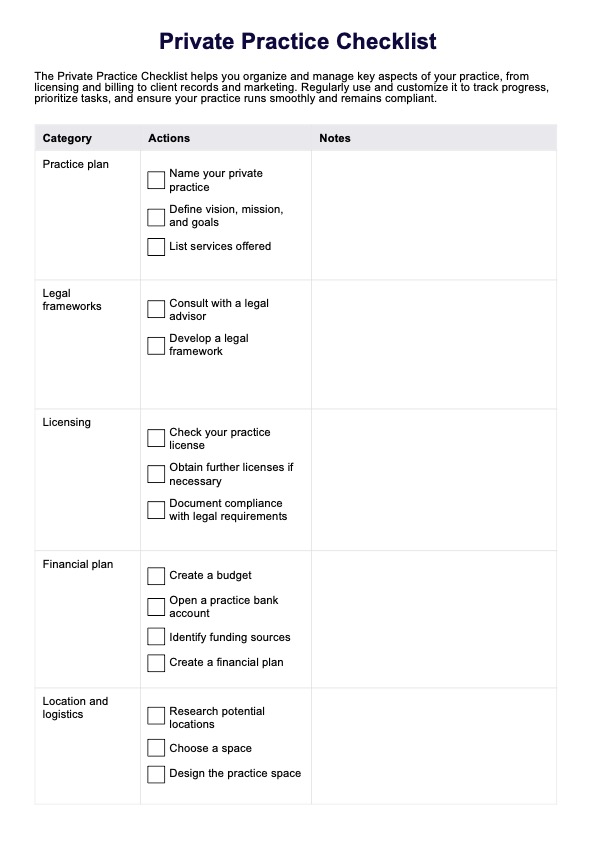
The Private Practice Checklist Template helps streamline all tasks in an organized format, allowing you to build the foundation for your endeavors successfully. To show you how this works, we have broken down the process into the following steps:
Step 1: Access the checklist
To access the Private Practice Checklist Template, click the "Use Template" button to open and customize it in the Carepatron app. If you prefer a PDF version, click "Download." This template helps ensure all key tasks are completed, making the process of starting and managing your private practice easier and more organized.
Step 2: Review and complete the checklist
The checklist includes key tasks to establish your practice, such as defining your name, vision, mission, and goals. Work through each item, ticking them off as you go, and use the "Notes" column to include further details or address any concerns. Tasks include setting up legal and financial frameworks, validating your license, choosing an office space, and securing appropriate insurance coverage.
Additional items involve identifying essential resources, building a professional network, creating policies and client forms, and implementing practice management software. Also, devise a marketing plan and recruitment strategy to ensure smooth operations and attract, especially private pay clients.
Step 3: Regularly use and track progress
Regularly use and customize it to track progress, prioritize tasks, and ensure your practice runs smoothly and remains compliant. We've provided an extra space where you can add more information about your private practice.