How to use our Immunization Record Form
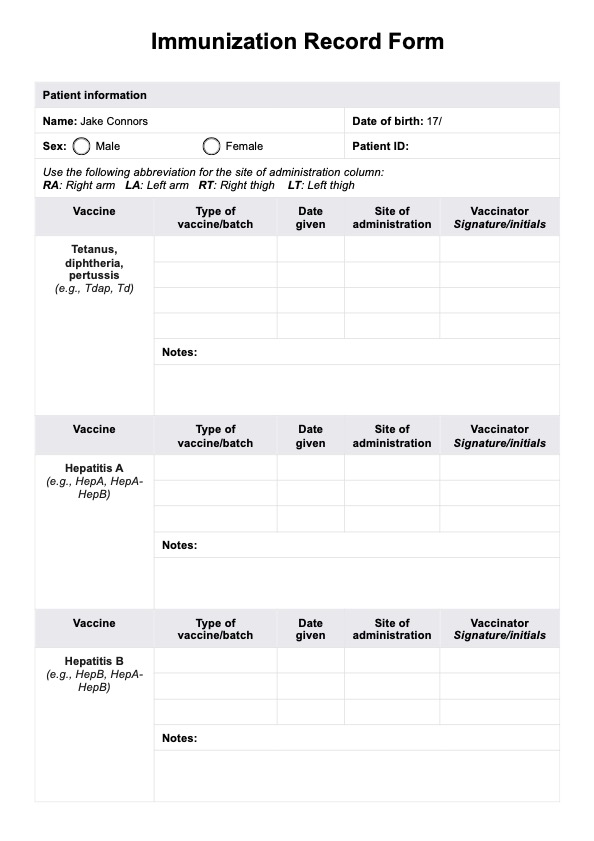
A well-structured Immunization Record Form is an essential tool for maintaining accurate vaccination records. Follow this step-by-step guide to use the form effectively in your practice:
Step 1: Access and download the template
You can access the template directly from this guide. Click "Use template" to open it within the Carepatron platform, where you can customize it to meet your organization’s requirements. Alternatively, click "Download" to get a free fillable PDF version for manual entry.
Step 2: Patient demographics and identification
Begin by documenting basic patient information, including their name, date of birth, sex, and patient ID. This section ensures proper identification and establishes a reliable record for tracking vaccinations over time.
Step 3: Record vaccine details
For each vaccine administered, specify the type of vaccine and batch number, enter the date in the appropriate format, record the site of administration (e.g., RA for Right Arm, LA for Left Arm), and ensure the vaccinator signs or initials in the Vaccinator Signature/Initials field.
Step 4: Add notes and observations
Use the notes section to document additional details, such as reactions, special considerations, or follow-up recommendations. This ensures a complete record for future reference.
Step 5: Store the completed form securely
After finalizing the form, it is crucial to store it securely to maintain patient confidentiality. For physical copies, ensure they are accessible only to authorized personnel. For digital records, consider using our HIPAA-compliant patient record feature for secure and efficient data management.